 semper
Getting started
What the app returns, how accounts work, and which frames you can load.
What it does
You give semper photos of a speckled surface before and during loading; it gives you back maps of how far every point moved and how much it stretched.
In DIC terms: one reference frame (undeformed) and several deformed frames (one per load step). It matches small windows called subsets on a grid and returns five maps per frame. New to this? Start with How DIC works.
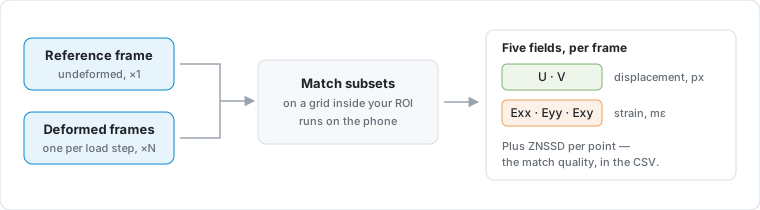
| Field | Meaning | Unit |
|---|---|---|
| U, V | Horizontal / vertical displacement | px |
| Exx, Eyy, Exy | Normal and shear strain | mε (millistrain) |
Getting in
Signing up is not enough — an admin has to approve your account before you can use the app.
In the app:
- Sign in with Google or email (password, or an emailed sign-in link).
- Email passwords need 8+ characters with upper and lower case, a digit, and a special character. Use Generate secure password if you want one filled in. Forgot password mails a link that reopens the app on a set-new-password form — you never leave the app to reset.
- After email sign-up, open the verification link, then sign in. Until you verify, sign-in is refused and a fresh link is sent each time you try.
- New accounts show Pending approval. Support is emailed automatically.
- Optional: tap Request access to add context in email.
- After an admin approves you, tap Check status. The screen does not refresh by itself.
Google and email-link sign-ins already prove the address, so they skip the password step.
Auth, storage, and erasure: Privacy.
If it fails: offline use is fine if this device was approved before — import and solve work without a network, and uploads wait until you are online. Still stuck on sign-in or approval? See Troubleshooting · signing in.
Images it accepts
Load a set of still photos, or a single video that semper samples into frames for you.
| Rule | If it fails |
|---|---|
| Every frame matches the reference pixel size | Blocking error — you cannot run |
| At least one reference and one deformed frame | Next stays off |
| At most Max frames (default 50) | Extras are dropped, with a toast |
Prefer PNG or TIFF. JPEG works but semper warns: compression damages the intensity gradients correlation needs.
RAW and DNG import only through Files, not Photos.
On import, semper measures your speckle. A weak pattern shows a low-texture warning and suggests a larger subset.
Starting from a video
Pick a video instead of photos and semper pulls the frames out for you — no need to export stills first.
When you choose a video, a sampling sheet opens: set the frame rate to sample at and the time segment to cover, and it shows a live estimate of how many frames you will get. The first frame becomes the reference, the rest become deformed frames in capture order.
The same Max frames cap applies (default 50) — if a segment would exceed it, the count is capped and the app notes it. Raise the limit in Settings → Analysis preferences if you need more.